PhilHealth Contribution
Know your rate. Understand your share.
Find your monthly contribution, see how the cost is shared, and follow simple steps to check or pay your contributions.
For employed and self-paying members.
PhilHealth Contribution Table 2026
5% contribution rateUse these examples to understand your monthly premium. The calculation uses an income floor of ₱10,000 and a ceiling of ₱100,000 under the PhilHealth contribution schedule.
| Monthly basic salary | Total premium | Employee share | Employer share |
|---|---|---|---|
| ₱10,000 or below | ₱500 | ₱250 | ₱250 |
| ₱20,000 | ₱1,000 | ₱500 | ₱500 |
| ₱30,000 | ₱1,500 | ₱750 | ₱750 |
| ₱40,000 | ₱2,000 | ₱1,000 | ₱1,000 |
| ₱50,000 | ₱2,500 | ₱1,250 | ₱1,250 |
| ₱75,000 | ₱3,750 | ₱1,875 | ₱1,875 |
| ₱100,000 or above | ₱5,000 | ₱2,500 | ₱2,500 |
Swipe the table sideways to see all four columns.
For employed members
The employee and employer normally pay half each. Use basic salary, excluding overtime, allowances, commissions, bonuses and 13th-month pay. Special sharing rules apply to some members, including kasambahays.
For self-paying members
Use the total premium column as a guide, based on your applicable monthly income. There is no employer share. Your payment amount depends on the income and membership details accepted by PhilHealth.
Example: A ₱30,000 basic monthly salary gives a ₱1,500 total premium: ₱750 from the employee and ₱750 from the employer.
PhilHealth Contribution Calculator
Estimate your monthly payment using the 5% rate. Select your membership type and enter your monthly salary or income to see the breakdown.
Your monthly estimate
Enter your details and select “Calculate my contribution” to see your estimated payment.
- Total monthly premium
- Employer share
- Income used for calculation
Estimate only, using the contribution table above. The income base is limited to ₱10,000–₱100,000. Employee estimates use standard equal sharing; special cases such as kasambahays are not covered. Self-paying estimates depend on the income accepted by PhilHealth. Final assessment and payroll rounding may differ.
How to Calculate Your PhilHealth Contribution
Your contribution starts with your monthly salary or income. Follow these four steps to understand how the total premium becomes your personal share.
-
Start with the correct income
Employees use monthly basic salary, not take-home pay. Exclude overtime, allowances, commissions, bonuses and 13th-month pay. Self-paying members use the monthly income accepted by PhilHealth.
-
Apply the income limits
Use ₱10,000 if your income is below the floor, or ₱100,000 if it exceeds the ceiling. For income between these limits, use the actual amount.
-
Multiply the income base by 5%
Multiply the amount from step 2 by 0.05. The answer is the total monthly premium, before any employer sharing.
-
Find the amount you pay
Under standard employee sharing, divide the total by two: half is your share and half is your employer’s. Self-paying members pay the full applicable premium.
Before comparing with your payslip: Check whether the deduction covers a full month or one payroll period. Ask your payroll team about any difference. Special rules apply to some members, including kasambahays and employed persons with disabilities.
How to Check Your PhilHealth Contributions Online
Use the official PhilHealth Member Portal to view contributions posted to your record. The calculator above estimates your payment; the portal shows your actual contribution records.
Before you start: Have your 12-digit PhilHealth Identification Number (PIN), portal password and an internet connection ready.
-
Open the official Member Portal
Use the button below. Check that the website address is memberinquiry.philhealth.gov.ph before entering your account details.
Open Member Portal -
Enter your login details
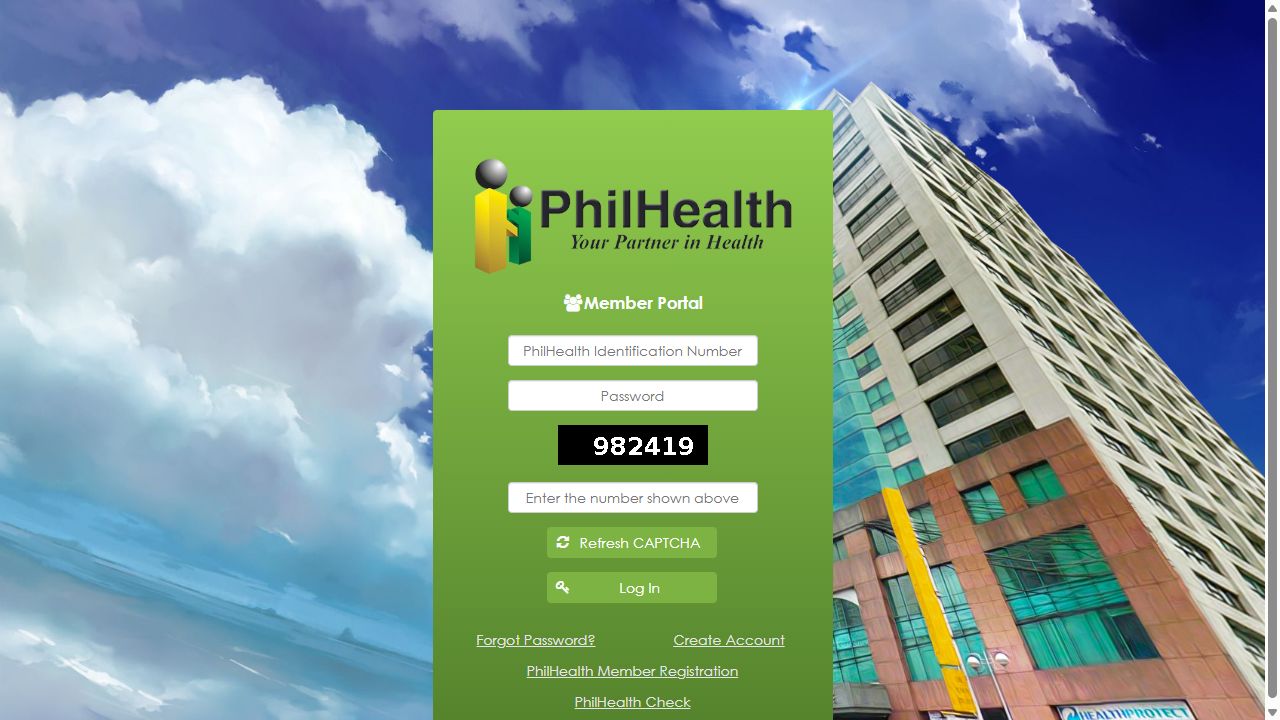
Enter your PIN and password. Type the CAPTCHA number shown on your screen, then select Log In. Use Refresh CAPTCHA if the number is difficult to read.
-
Open Premium Contribution
After signing in, open the Premium Contribution section to view your contribution records. The menu position may vary with portal updates or screen size.
-
Review your posted payments
Compare the contribution periods and amounts with your receipts or payroll records. Note any missing or incorrect entries, then log out when you finish.
Cannot sign in?
Use Forgot Password? on the portal. If you already have a PIN but no portal account, choose Create Account and follow the email activation instructions. PhilHealth Member Registration is for applying for member registration and a PIN.
A payment is missing?
For employer-paid contributions, ask your payroll or HR team to check the remittance. For payments you made yourself, keep the receipt and transaction reference ready and ask PhilHealth to verify the posting.
How to Pay Your PhilHealth Contribution
Self-paying members can pay online or through an authorized collecting agent. Start by checking your Statement of Premium Account (SPA), then choose the payment method that suits you.
Paying through an employer? Your employer normally remits your employee share together with its share. Check with payroll before making a separate payment for the same period.
First, get your SPA
A SPA is your contribution billing statement. It identifies the payment period, reference number and amount due.
- Check your Member Portal for an available SPA. You can also use the official SPA Generator or ask a PhilHealth office for help.
- In the SPA Generator, read the terms and privacy notice. If you agree, select the acknowledgement checkbox and Accept, then follow the on-screen instructions.
- Check your PIN, covered months and amount before saving the SPA. If anything is wrong, request a correction before paying.
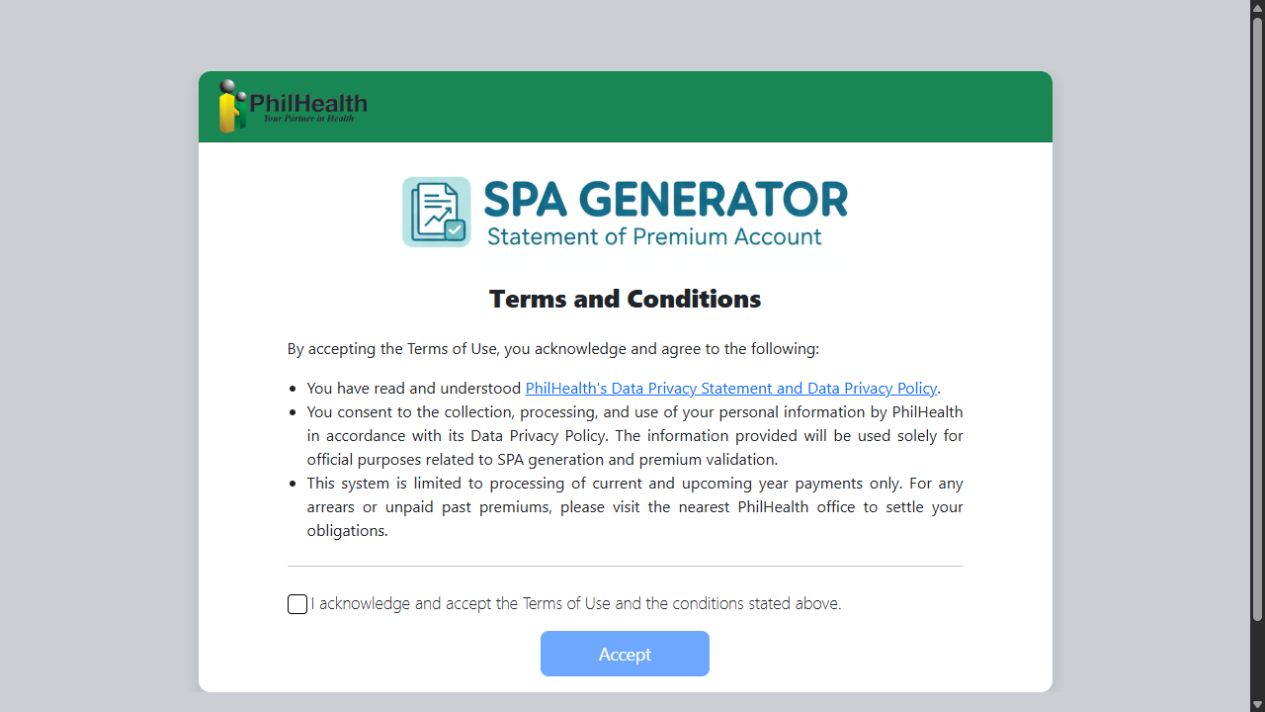
SPA rules for 2026–2027: During 2026, SPA is the standard payment process, with limited, documented exceptions for system or record-related problems. From 1 January 2027, a valid SPA is strictly required, subject to authorized exceptions, including eligible geographically isolated and disadvantaged areas. If you cannot obtain one, ask PhilHealth about the applicable process.
Pay online through the portal
- Sign in to the official Member Portal and open its SPA or payment area. PhilHealth’s portal guide calls this Payment Management.
- View or generate the SPA for the period you want to pay. Confirm the amount and covered months.
- Choose an available payment option and follow the provider’s checkout instructions. Check any service fee before confirming.
- Save the payment confirmation and download the electronic acknowledgement receipt when available.
Pay at an authorized counter
- Choose a PhilHealth office with cashier services or an accredited collecting agent. Confirm that the branch accepts your payment type.
- Present your SPA or supported SPA QR code. Complete the payment slip if the collecting agent requires one.
- Check your PIN, payment period and amount with the cashier before paying the amount shown on the SPA.
- Keep the official receipt or validated payment slip and transaction reference.
After payment: Check your posted contributions in the Member Portal. If a payment is pending or missing, keep your proof of payment and verify its status with the payment provider or PhilHealth before paying the same period again.
PhilHealth Registration: Choose the Right Process
Getting a PhilHealth Identification Number (PIN) and creating a Member Portal account are different tasks. Choose the option below based on whether you already have a PIN.
Create your Member Portal account
Use your existing PIN to set up online access to your membership and contribution records.
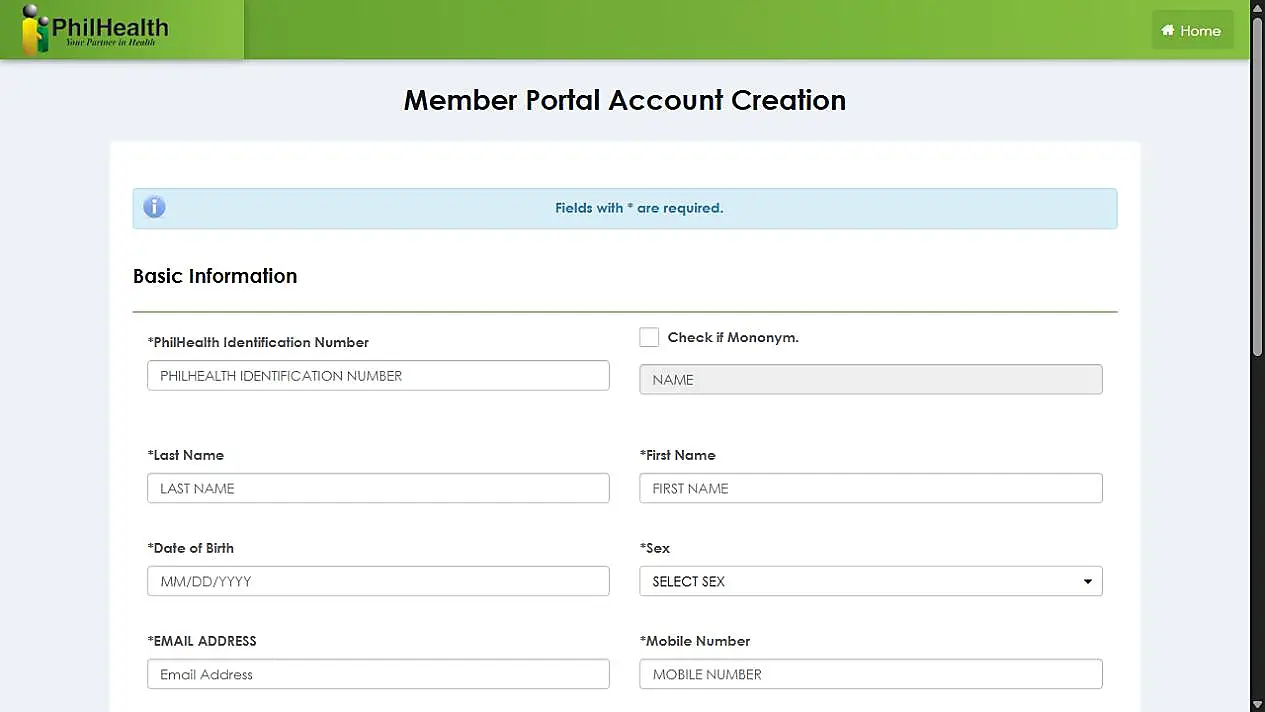
- Open the official account creation page using the button below.
- Enter your PIN, name, birth date, sex, email address and mobile number. Use details that match your PhilHealth record.
- Create and confirm a password that meets the requirements shown on the form.
- Enter the CAPTCHA shown on your screen and select Create Account.
- Check your email and follow the activation instructions. Then use the login and contribution-check guide above.
Apply for PhilHealth membership
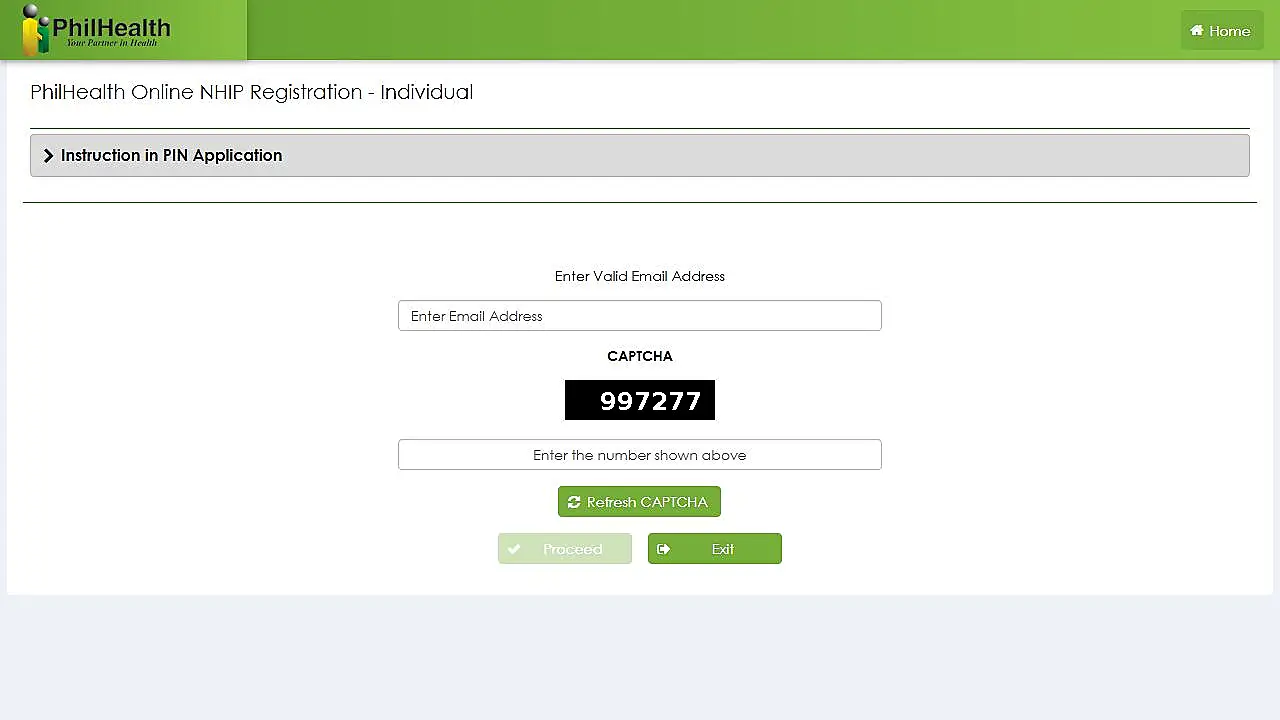
Use the online individual registration facility if you have not yet been assigned a PIN.
- Prepare a completed PhilHealth Member Registration Form (PDF) and the supporting identity documents required by PhilHealth.
- Open the registration page and read Instruction in PIN Application.
- Enter a valid email address and the CAPTCHA displayed on the page, then select Proceed.
- Follow the remaining application steps, upload the required documents, and review your details before submitting.
- Check your email for application updates and your PIN after successful processing.
The portal lists 3–5 working days for complete applications. It also states that the email address can be used only once and that a registrant must not submit multiple applications.
Already registered but forgot your PIN? Your PIN is permanent. Check your existing PhilHealth documents or ask PhilHealth to help retrieve it instead of applying for another number. If you already have a portal account but forgot its password, use Forgot Password? on the login page.
PhilHealth Contribution FAQs
Quick answers to common questions about contributions, payments and membership records.
How much is the PhilHealth contribution in 2026?
The rate is 5% of the applicable monthly income base, with a total monthly premium of ₱500 to ₱5,000. The amount you personally pay depends on your membership type. Use the contribution calculator to estimate your share.
Is the full 5% deducted from an employee’s salary?
Under standard employee sharing, no. The employer and employee each pay half of the total premium. For example, a ₱20,000 basic monthly salary gives a ₱1,000 total premium, usually split into ₱500 each. Special rules apply to some membership categories.
Can I pay through GCash, Maya or a bank card?
PhilHealth lists GCash, Maya and credit/debit cards among its Member Portal payment options. Use an option currently offered for your transaction and review any fee before confirming. Follow the payment guide to prepare your SPA first.
What should I do if a payment is missing from my record?
Compare the missing period with your receipt, transaction reference or payslip. Ask your employer to check payroll remittances, or contact PhilHealth about a payment you made yourself. Keep the supporting documents for verification. Use the contribution-check guide to review the posted entries.
Can I settle missed contributions from earlier months?
Yes, but ask PhilHealth to confirm the applicable periods, outstanding amount and any interest. The public SPA Generator currently directs members with older unpaid premiums to a PhilHealth office. Your assessment can depend on the contribution year and your membership circumstances.
What if I lose my job or cannot afford the contribution?
Ask PhilHealth to review and update your membership status. If you cannot afford the premium, ask about a financial-capacity assessment through the appropriate social welfare office or a licensed social worker. Assistance or reclassification depends on the assessment and required documents; it is not automatic when employment ends.
Do I need a new PhilHealth number when I change jobs?
No. Your PhilHealth Identification Number (PIN) is permanent. Give your existing PIN to your new employer and update any membership details that have changed. If you cannot find your PIN, ask PhilHealth for retrieval assistance instead of applying for a second number.
Is a SPA the same as a payment receipt?
No. A Statement of Premium Account (SPA) shows the amount billed for a contribution period. It does not prove that you have paid. Keep the official receipt, validated payment slip or electronic acknowledgement issued after payment, and check that the contribution is posted to your record.